

© 2006-2026 Radicore Software Ltd
Latest news
RADICORE v2.33.0 released05 May 2026
RADICORE v2.32.0 released07 April 2026
RADICORE v2.31.0 released13 January 2026
Knowledge Base
Creating a customisable software package08 January 2026
The Road to Rapid Application Development (RAD)21 December 2024
Evolution of the RADICORE framework01 June 2022
Articles
Global Awards Winner 2025/2630 April 2026
The CEO Views Awards 202510 November 2025
Business Chief's Insights Awards 202507 November 2025
Other Stuff
Dependency Injection for Heretics20 March 2026
Programming is an art, not a science06 March 2026
PHP Best Practices for Database Applications31 December 2025
Videos
Global Awards Winner 2024/2501 March 2025
Global Awards Winner 2023/2428 July 2024
What are Transaction Patterns and how are they used in the RADICORE framework?16 May 2024
How is it RAD?
RAD standards for Rapid Application Development, so to be classed as "rapid" a framework should be able to assist the developer in creating application components as rapidly as possible, and preferably at a faster rate than any rival frameworks. In my experience the speed at which developers can create new components is directly proportional to the amount of reusable code which is at their disposal. The idea is that the more reusable code you have at your disposal then the less code you will have to write and maintain. The less code you have to write to get the job done then the quicker you can get it done and the more productive you will be.
An enterprise application will typically contain hundreds if not thousands of separate components known as User Transactions. While each of these transactions may involve executing a large amount of program code, it is simply not economical to duplicate every line of code for every transaction. When writing software it is good practice to spot where logic is duplicated and to move that logic into some type of reusable module so that it can be defined once and then referenced multiple times. This reusable module may be one of the following:
- A function within a library which can be called from many places.
- An abstract class which can be inherited by multiple concrete classes.
- Some sort of template which provides a standard structure which can be filled in with details at run time.
The real measure of a good programmer is his ability to spot repeating patterns in code. While it is easy to spot where entire segments of identical code have been duplicated what is less easy is where there are similarities mixed with slight differences. This then requires the ability to separate out the similar from the different, the abstract from the concrete, so that the similar can be placed in a reusable module and the different can be placed in unique modules. This leads to a technique known as programming-by-difference so that after you have spent some time in creating a reusable module to contain the similar you can concentrate all your remaining time on dealing with the differences.
So how much code can be converted into reusable modules? Program code can be roughly split into two categories:
- Business logic - this is the heart of the application as far as the end user is concerned.
- Non-Business logic - this is sometimes referred to as boilerplate code or glue code which deals with common things such as user interface code and database code. This is the code that allows the relevant business rules to be processed at the relevant time on the relevant data.
In the RADICORE framework 100% of the non-business logic is supplied by the framework. This means that each developer can spend 100% of his time on the business logic.
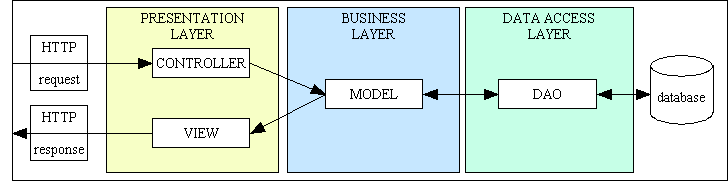
The first step in providing reusable components is to use an architecture which is comprised of modules which fall into one of these two categories, as shown in the following structure diagram:
3-Tier Architecture combined with Model-View-Controller
During the experience I gained while building hundreds of transactions for numerous systems in other languages I observed a number of different patterns which appeared numerous times. It was quite common, having built a transaction for one database table, that the same processing was required on a different database table. This meant that the logic was the same and could potentially be shared, with the only difference being the data. This enabled me to construct a library of reusable Transaction Patterns. All I needed to do was find a simple way of linking a pattern with a database table to generate a combination which was runnable. Fortunately I found a way of utilising the three pillars of OOP - namely encapsulation, inheritance and polymorphism - to engineer a solution.
Virtually every transaction in every subsystem is comprised of a different collection of the above four modules, so I engineered a way to provide each of these modules with as much reusable code as possible:
All of these modules supply 100% of the boilerplate code. The only place where developers need to insert their own custom business logic is in the "hook" methods within each concrete table class. All non-business logic is inherited from the abstract table class.