

Glossary


3-Tier Architecture
An architectural pattern of software development in which the application logic is separated into different tiers or layers:
- The Presentation Layer or User Interface, which handles all communication with the user.
- The Business Layer, which has a separate object for each business entity.
- The Data Access Layer which communicates with the database.
This allows individual layers to be enhanced, or even replaced, with minimal impact on the other layers. For example it should be possible to change nothing but the contents of the presentation layer in order to switch from HTML output to PDF output, or to change nothing but the contents of the data access layer in order to switch from one database engine to another.
A more detailed description of the 3-Tier Architecture can be found here, and its implementation within RADICORE can be found here. This structure can also be shown in the following diagram:
Abstract Table Class
Because the business layer within RADICORE is built using object oriented (OO) principles there is a separate class for each database table. This actually produces two types of code:
- Code which can be applied to any database table.
- Code which is unique to an individual database table.
The common sharable code has therefore been split off into a separate abstract superclass, while the unique code is specified in a series of subclasses, one per table. Each subclass extends the abstract superclass and inherits all its properties and methods so that the end result is a merging of the two.
The superclass comes with the RADICORE framework while each subclass is constructed by the export function in the Data Dictionary.
For more details about the abstract table class within RADICORE please click here.
Audit Logging
Please refer to What is an Audit Logging system?
Back End
A typical software application which is available on the web has three basic components:
- A front end website which is accessible to the public but which has limited functionality (such as order entry, payments).
- A back end administrative application which is accessible to members of staff and which has full functionality (such as order fulfilment, inventory control, shipments, invoicing, et cetera).
- A central database which is shared by both.
For more details please refer to Web Application.
Browser Independent
The output that RADICORE sends to the web browser conforms to standards governed by the World Wide Web Consortium and is therefore viewable on any standards compliant web browser. There is none of this "best viewed using ..." nonsense. These technologies include the following:
- XHTML - for all web pages.
- CSS - provides the styles (fonts, font sizes, colours, etc) for all web pages.
- XML - for holding all output from the business layer before being transformed by an XSL file.
- XSL - for converting all XML data into HTML with a library of reusable XSL files.
JavaScript is not used in the core parts of the framework as it cannot be guaranteed to be compatible in all browsers. However, provision has been made for it to be included in add-on applications as an option.
RADICORE has been tested with Internet Explorer, Firefox, Opera and Safari. Client-side XSL transformations have been tested with Internet Explorer, Firefox and Safari. They do not currently work in Opera due to a longstanding bug.
Business layer (or tier)
This is the middle part of the 3-Tier Architecture which handles all business rules, data validation and task-specific behaviour. It receives requests from and returns results to the Presentation layer. It may also communicate with a database by sending requests to and receiving results from a component in the data access layer. The business layer is also equivalent to the model component in the Model-View-Controller design pattern.
In Object Oriented Programming (OOP) there is usually one business object for each business entity, which usually means that each business entity has its own table in the application database. RADICORE expands on this idea by using the Data Dictionary to import the database structure which can then be exported into a series of OO classes, one per database table.
Cascading Style Sheet (CSS)
Although it is possible to specify within each HTML document how that document should be displayed by hard-coding the font names, font sizes, background colours, foreground colors, spacing, margins, positioning, et cetera, that is now deemed to be very bad practice. The preferred method is to take all style definitions out of individual HTML documents and maintain them in a central CSS file (or files). The HTML documents refer to styles by their "class" or "id" names and which CSS file(s) to use, and the CSS file(s) contain the actual specifications for each of those "class" or "id" names.
This technique provides the following benefits:
- It makes the HTML documents smaller as all style specifications have been removed. This reduces the bandwidth required to send those documents over the network and makes each document quicker to load. Although there is the initial overhead of sending the CSS file(s) to the client's browser, this is done just once as all subsequent access is from the browser's cache.
- It makes it easier to make changes across a whole application as it is no longer necessary to change every page produced by that application. Simply change the central CSS file(s) and that change will instantly be incorporated into every page.
The World Wide Web Consortium (W3C) is responsible for the CSS Specification.
Please also refer to The use of Cascading Style Sheets within Radicore.
Client (Desktop) Application
In traditional Client/Server computing each application has its own client program which serves as its user interface and has to be separately installed on each user's personal computer. An upgrade to the server part of the application typically requires an upgrade to the clients installed on each user workstation, which adds to the support costs and decreases staff efficiency.
Client/Server is a network application architecture which separates the client (usually the graphical user interface) from the server. Each instance of the client software can send requests to a server or application server.
Client/Server is a scalable architecture, whereby each computer or process on the network is either a client or a server. Server software generally, but not always, runs on powerful computers dedicated for exclusive use to running the business application. Client software on the other hand generally runs on common PCs or workstations. Clients get all or most of their information and rely on the application server for things such as configuration files, business application programs, or to offload computer-intensive application tasks back to the server in order to keep the client computer (and client computer user) free to perform other tasks.
Because of the amount of software which is required on the client device this configuration is often referred to as "thick client".
Component Script
Every user transaction requires one of these scripts as it identifies what action is to be performed on what object. It is a very small script which does not contain any logic, it merely provides the identity of the following:
- Which model object(s) in the business layer is/are to be used.
- Which view object is to be used.
- Which controller is to be used.
Click here to see a sample of a component script.
Component Templates
This is another term for Transaction Pattern.
Controller
A controller offers facilities to change the state of the model in the Model-View-Controller design pattern. The controller interprets the inputs from the user (in a web application these are HTTP GET or POST requests) and instructs the model and/or the view to change as appropriate.
In RADICORE the controller for each user transaction is actually split into two parts:
- A unique component script which identifies which model and view are to be used for this particular user transaction.
- A reusable controller script which performs set actions using whatever model and view components are passed to it.
This arrangement allows the same controller script to be reused by any web page (user transaction) which follows the same pattern. The RADICORE package contains less than 30 controller scripts which service more than 500 components.
CRUD
In computing, CRUD is an acronym for Create, Read, Update, and Delete. It is used to refer to the basic functions of a database or persistence layer in a software system. A CRUD application is one which allows sets of data to be maintained by a series of screens, forms or pages. The database may be private to a single client, or may be shared by many clients.
Examples of typical CRUD applications are: timesheet entry, sales order processing, purchase order processing, accounting, invoicing, and stock control.
A non-CRUD application involves activities other than the creating, retrieving and updating of form-based data in a database. Examples are - image processing, flight simulators, games, number crunching (weather forecasting, plotting satellite trajectories), Computer Aided Design, Process Control and Robotics.
Data Access layer (or tier)
This is the part of the 3-Tier Architecture which handles all communication with the persistent data store (e.g. a database). This is usually achieved by constructing an SQL query following a request from the business layer or model and sending it to the database engine via the relevant API (Application Programming Interface). Any result may have to be unpacked or formatted before being returned to the business layer.
Unlike other implementations which have a separate Data Access Object (DAO) for each business entity, RADICORE has a single DAO for the entire application. Because the DAO is specific to a single database engine (such as MySQL, PostgreSQL, Oracle or SQL Server) it is possible to deploy any application on a different database simply by switching to the relevant DAO.
For more details about the DML class/Data Access Object within RADICORE please click here.
Data Access Object (DAO)
This is an object/component which exists in the Data Access Layer.
Data Dictionary
Please refer to What is a Data Dictionary?
Database Independent
Potential clients may be discouraged from using RADICORE if it were limited to a single vendor's database, so it uses standard SQL and avoids, as far as is possible, any non-standard proprietary extensions. This means that RADICORE, although developed using MySQL, will run on any SQL-compliant database (provided that a DAO has been written for that database). Currently there are DAOs for the following:
- MySQL 4 (using the mysql_* functions)
- MySQL 4.1 and above (using the mysqli_* functions)
- PostgreSQL v8 and above
- Oracle 10g and above
- SQL Server 2008 R2 and above
The following features are avoided as much as possible:
- Database Triggers
- Database Stored Procedures
- Database Constraints
Some people consider these features to be essential when in fact they are nothing more than an option. There is nothing that can be done with database logic that cannot be done with application logic, whereas the converse is definitely not the case. Moving logic from the application to the database is usually more expensive in terms of developer effort, therefore it cannot really be justified in a RAD environment.
Some people say that stored procedures are more efficient than application code, but if the speed of the application code is "adequate" then can you really justify the expense and delays in making it "more than adequate"?
The RADICORE philosophy is that the database is merely a container to be used for the storage and retrieval of data, whereas the application is the place for all business logic.
Design Patterns
The official definition goes along the lines of "A pattern for software architecture describes a particular recurring design problem that arises in specific design contexts, and presents a well-proven generic scheme for its solution. The solution scheme is specified by describing its constituent components, their responsibilities and relationships, and the ways in which they collaborate".
While many people regard design patterns as the ultimate in building blocks for application development, I personally think that they are entirely the wrong level of abstraction. An application is made up of a number of different user transactions (or units-of-work from the user's perspective), and while a transaction may actually be built using a collection of design patterns I have never seen any specification for a transaction which identifies the design patterns which it is supposed to use. Transaction specifications are usually limited to what data it requires, what the output looks like, how it behaves, and what business rules need to be processed.
Design patterns are also not real patterns as they do not provide a template from which usable copies can be built. They are simply descriptions of patterns, and require a significant amount of effort to be spent on each implementation. It is rarely possible to create a template for a design pattern, then create working copies from that template.
In order to generate user transactions it is much better to use a system of patterns which exist as physical templates from which working copies can easily be made. Within the Radicore framework there exists a collection of transaction patterns which provide this facility. It is possible to create a working transaction, or even a set of transactions, for a database table simply by matching a table with a pattern and pressing a button.
Enhancing the generated transactions
The transactions that are generated from Transaction Patterns will be sufficient to perform the basic functionality of moving data between the database and the user interface, with basic data validation. By default the screen structure will contain all fields/columns in the order in which they were defined in the database. This default behaviour can be enhanced as follows:
- A different screen layout can be obtained by modifying the screen structure file, such as changing where on the screen a particular field will be displayed, or removing a field altogether. New fields cannot be added unless corresponding values are provided by the table class file.
- Additional processing, such as for business rules, can be included by adding code to any of the empty customisable methods which are defined in the abstract table class. These deliberately do not have any code in them, but they can be copied to the table class file so that code can be inserted. At run-time the replacement version in the table class file will be processed instead of the original empty version.
Enterprise Application
Enterprise applications are used by organisations both large and small in order to manage their business-critical data. This data is usually more important and longer lasting than the software used to process it. The data will more than likely be maintained in a relational database and have a large number of user interface screens as it may be viewed in different ways in different contexts by different people. It is usually only available to the organisation's members of staff who are much fewer in number than the thousands who may access a public website. Enterprise applications may consist of many subsystems or modules which, although they have to work together to cover all the aspects of an organisation's business, may be developed by different teams, possibly in more than one programming language, and possibly with different modules provided by different vendors. Some modules may be bespoke or custom-made for a single customer while others could be built as packages which can used by many customers.
Enterprise applications cover areas such as:
- Parties - organisations and people, customers and suppliers
- Products - products, categories, features, prices, bill of materials
- Orders - sales orders, purchase orders, transfer orders
- Invoices - sales invoices, credit notes, purchase invoices
- Inventory - facilities, containers, stock
- Shipments - customer shipments, supplier shipments, returns
- Requests - requests, requirements, quotations, agreements
- Work Effort - timesheets, holidays, expenses
- Project Management - work schedules, phases, milestones, activities, gantt charts
- Asset Management - fixed assets, buildings, machinery, equipment, costs, depreciation
- Accounting - general ledger, accounts receivable, accounts payable
- et cetera
Enterprise applications do not deal in areas such as:
- Gambling and gaming
- Image and sound processing
- Word Processing
- Device Drivers
- Compilers
- Operating Systems
- Process Control
- Robotics
- Number crunching, such as weather forecasting
- Avionics and missile guidance
- Artificial Intelligence (AI)
Enterprise applications normally require the following which can be built into a framework (such as Radicore):
- A Role Based Access Control (RBAC) system which controls which tasks can be accessed by which users. An enterprise application may contain thousands of tasks, but not all of these tasks can be accessed by every user, so an access control mechanism is absolutely essential.
- An Audit Logging system so that any changes to the database can be logged and viewed. Some applications handle very sensitive data, and all updates to that data must be logged so that a complete audit trail of who changed what and when is available.
- A Workflow system so that events can either automatically trigger other events, or produce prompts that additional action is required.
- Certain applications may require a strong Security Model because they need to be HIPAA or SOX compliant.
Some frameworks like to claim that they support Rapid Application Development (RAD) but as far as I am concerned these are false claims simply because they are unable to provide the following:
- The generation of Model classes from the database structure. Other frameworks require you to build such classes from scratch while Radicore's Data Dictionary can generate them for you.
- The generation of user transaction scripts from a series of pre-defined Transaction Patterns. Other frameworks require you to build such scripts from scratch while Radicore's Data Dictionary can do this for you.
- With other frameworks you have to write volumes of code in order to create the simplest of maintenance screens for each database table. With Radicore you can generate such screens without having to write a single line of code - no PHP, no SQL, no HTML. No method of writing code is faster than not having to write any code at all.
For more information regarding enterprise applications you can read this description by Martin Fowler.
Extranet
An extranet is a private network that uses internet protocols, network connectivity and possibly the public telecommunication system to securely share part of a business's information or operations with suppliers, vendors, partners, customers or other businesses. An extranet can be viewed as part of a company's intranet that is extended to selected users outside the company (eg: normally over the Internet).
Form Families
In order to deal with the contents of a typical database table it is usual to provide facilities to create, read, update and delete entries as well as list (browse) and search (enter selection criteria). In traditional designs it is common practice to build all these operations into a single unit, but although the number of units is small the complexity of each one is quite large. Large, complex units tend to require large amounts of time to develop. The philosophy adopted within RADICORE is to create a large number of smaller units where each unit deals with a single operation. Although the number of units is larger, the complexity is greatly decreased, which in turn can lead to decreased development times. The group of forms which, when put together deal with all the operations on a database table, is known in RADICORE as a "forms family" as represented in the following diagram:
A typical Family of Forms
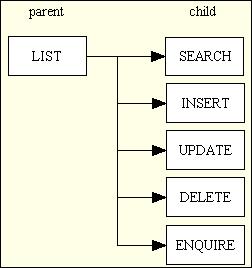
In this structure the LIST (parent) component is the only one that is available from a menu button - all the other child components can only be selected from a navigation button within a suitable parent component. In most cases the child component will need the primary key of an occurrence from the parent component before it can load any data on which it is supposed to act. In this case the required occurrence in the parent screen must be marked as selected using the relevant checkbox before the link/button for the child component is pressed. Standard code will convert the primary key(s) of the selected occurrence(s) into a string which is suitable as the WHERE clause in an sql SELECT statement, then pass this string to the child component.
In some infrastructures the developer is expected to create some sort of flow control script which identifies the movement between parent and child forms. In RADICORE this is dealt with by defining navigation buttons in the MENU database using the relevant online screens.
Each one of these functions - list, search, insert, update, delete, enquire - is implemented using its own pattern which includes a controller and an XSL stylesheet to produce the XHTML output. The same family of forms can be constructed for any number of different database tables, and they will all make use of the same controllers and XSL stylesheets. As all the 'detail' forms (search, insert, update, delete and enquire) all share the same structure - they show the details from a single database occurrence - they can actually share the same XSL stylesheet. Thus the use of transaction patterns within RADICORE produces a large number of reusable controllers and XSL stylesheets, and it is the large volume of reusable code which makes rapid application development possible.
Framework
See infrastructure.
Front Controller
Unlike the page controller where the web server is able to send the HTTP request directly to the script which is responsible for responding to that request, this method forces the web server to funnel each request through a central script. That script then has to pass the request on to another lower level script to actually process the request and produce a response. This method can produce URLs such as:
http://www.domain.com/application.jsp?object=customer&action=add
This method is not used in RADICORE as it produces a bottleneck and replicates functionality that can be performed more efficiently by the web server.
Front End
A typical software application which is available on the web has three basic components:
- A front end website which is accessible to the public but which has limited functionality (such as order entry, payments).
- A back end administrative application which is accessible to members of staff and which has full functionality (such as order fulfilment, inventory control, shipments, invoicing, et cetera).
- A central database which is shared by both.
For more details please refer to Web Application.
HTML document
This is a document which uses a standard markup language in order to display information within the client's internet browser. The output style is also affected by CSS files.
In the Radicore framework all HTML documents are created by putting all the relevant data into an XML document which is then transformed into HTML by means of an XSL stylesheet.
Hook methods
These are part of the Template Method Pattern which contains a mixture of invariant/fixed and variable/customisable/hook methods.
For more information please refer to How Radicore's Hook System Works.
Infrastructure (a.k.a. "framework")
In the physical world an example of infrastructure is the network of roads, railways, power supplies, water supplies, sewers, drains, shops, schools and hospitals. A house built within such an infrastructure has value, whereas a house without any such infrastructure is just a pile of bricks.
Similarly a collection of software components is just a loose assortment of bits and pieces with little value to the user unless it is integrated into some sort of infrastructure or framework. This is what turns a loose collection of components into a coherent application. It will have characteristics such as
- It will allow the user to quickly ascertain what options are available so that the right one can be activated.
- It will allow quick and easy movement from one component to another, and back again.
- If the components are related then then the user's current selection (context) should be passed between them without having to be re-entered.
- It may have standard methods of dealing with errors and exceptions.
- It may have standard methods of user identification and controlled access to individual components.
The RADICORE framework has all of this, and more.
Some developers waste an enormous amount of time in building a new infrastructure for each application, either because they don't know how to write reusable infrastructures or because they think that each application needs one that is tailor-made. Experienced developers know the benefit of reusable code, and the creation of a reusable infrastructure is simply one step further than the creation of common subroutines. The infrastructure used in RADICORE is based on a system that was originally designed and built in COBOL in the eighties, rebuilt in UNIFACE in the nineties, and rebuilt in PHP in the noughties.
Be aware that some products which call themselves frameworks are in fact nothing more than a collection of library functions. To qualify as a framework a product requires much more, as explained in What is a Framework?
Internationalisation
Please refer to What is Internationalisation?
Internet
The Internet, or simply the Net, is the publicly accessible worldwide system of interconnected computer networks that transmit data by packet switching using a standardized Internet Protocol (IP) and many other protocols. It is made up of thousands of smaller commercial, academic, domestic and government networks. It carries various information and services, such as electronic mail, online chat, and the interlinked web pages and other documents of the World Wide Web.
Intranet
An intranet is a local area network (LAN) used internally in an organization to facilitate communication and access to information that is sometimes access-restricted. It uses the same concepts and technologies of the Internet such as clients and servers running on the HTTP protocol, but it cannot be accessed by client devices which are not physically part of that LAN.
LDAP (Lightweight Directory Access Protocol)
LDAP is an application protocol for querying and modifying directory services running over TCP/IP. An LDAP server can be used as a centralised method of user authentication which can be accessed by many different applications, thus removing the need for each application to maintain its own set of user credentials (refer to Single Sign-On). For additional security this may involve Two Factor Authentication.
This is an optional feature within Radicore, and can be turned on by following the instructions in FAQ114.
See also RADIUS.
Menu system
Please refer to What is a Menu system?
Menu buttons
These are available on every screen and allow the user to jump to any available option within the application. Only those options which exist on the current menu "page" will be displayed. By selecting an option one of two things will happen:
- If the option is another menu then the contents of that menu will be displayed.
- If the option is a user function then that function will be activated.
Note that moving from one user function to another via a menu button does not pass current context between the two. This can only be achieved with navigation buttons.
The menu bar is visible on every page, and its contents will vary depending on the current selection. The identity of each menu page, and the contents of those pages, is maintained through a series of online functions built into the MENU system. The code for displaying menu buttons and dealing with user selections is built into the RADICORE infrastructure and needs no additional developer effort.
Model
The model is that part of the Model-View-Controller design pattern that represents enterprise data and the business rules that govern access to and updates of this data. The model manages the behavior and data of the application domain, responds to requests for information about its state and responds to instructions to change state. The model is another name for the domain layer or business layer.
In RADICORE there is a separate domain/business object for each business entity within the application. Each business entity has its own table in the database and a corresponding OO class which inherits a large amount of reusable code from an abstract table class. Each table class is initially generated from the Data Dictionary after importing the data structure from the database. This initial class contains all that is necessary to handle the basic CRUD operations on the database table including data validation and referential integrity. All the developer has to do is add in the code to deal with any additional business rules as and when required. If the structure of the database table is ever modified it can be re-imported into the Data Dictionary which will update the metadata in order to preserve any existing information. This revised structure can then be exported in order to make itself available to the table class. The table class itself will not be overwritten in case it contains any custom code.
Model-View-Controller (MVC)
A design pattern of software development in which the application logic is split into separate modules:
- The Model which contains all business (domain) logic.
- The View which displays a visual representation of the model.
- The Controller which acts as the interface between the user, the model and the view.
Although many applications use a persistent storage mechanism (such as a database) to store data, the MVC design pattern does not specifically mention this data access layer. The purpose of the MVC pattern is to separate the model from the view so that changes to the view can be implemented, or even additional views created, without having to refactor the model.
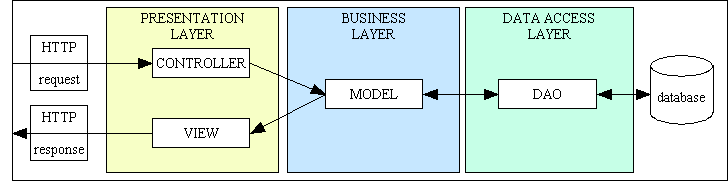
A more detailed description of the MVC design pattern as used in RADICORE can be found here. This structure can also be shown in the following diagram:
Figure 2 - Model-View-Controller (with 3-Tier Architecture)
MT (Multi-Tenancy)
Please refer to Virtual Private Database (VPD).
Multi-Tenancy (MT)
Please refer to Virtual Private Database (VPD).
Navigation buttons
While some user functions are accessible via menu buttons others can only be selected from within another function. This is because the function requires some sort of context before it can operate. For example, while the LIST USERS function (which displays summary details for a number of users) can be called from a menu, the ENQUIRE USER DETAILS function (which displays full details for a single selected user) can only operate if it is passed the identity of an existing user to begin with.
In the RADICORE design a function with navigation buttons is known as the "parent", and a function which can be activated from that parent is known as as a "child". Note that a parent may have any number of children, and a child may have more than one parent. A child may also have children of its own.
Each user function has a single set of navigation buttons (which look like this) which are maintained through a series of online functions which are built into the MENU system. The code for displaying navigation buttons and dealing with user selections, including the passing of context from parent to child, is built into the RADICORE infrastructure and needs no additional developer effort.
Object Oriented Programming (OOP)
This is a method of programming which is oriented around objects. Such programs can take advantage of Encapsulation, Polymorphism, and Inheritance to increase code reuse and decrease code maintenance.
- A class is a blueprint, or prototype, that defines the properties (variables, data) and the methods (functions, operations) common to all objects of that class.
- Encapsulation is the act of placing data and the operations that perform on that data in the same class. The class then becomes the 'capsule' or container for the data and operations.
- An object is an instance of a Class. It is possible to create (instantiate) multiple instances (objects) of the same class at the same time.
- Inheritance is the reuse of base classes (superclasses) to form derived classes (subclasses). Methods and properties defined in the superclass are automatically shared by any subclass.
- Polymorphism is where different classes share a common interface, therefore the same method used on different objects will use a different implementation. For example, a SHAPE superclass has a separate subclass for SQUARE, CIRCLE and TRIANGLE. All 3 subclasses have a common method called getArea() which, when called, will execute a different formula to determine the area of that particular shape.
RADICORE uses OOP in the following ways:
- Encapsulation - Each database table has its own class which contains all the methods and properties necessary to communicate with that database table.
- Inheritance - Code which is common to all database tables is defined in an abstract table class. Each database table subclass 'extends' the abstract superclass in order to produce what is known as a 'concrete' class.
- Polymorphism The controllers communicate with each database table object via a common set of methods. This means that a controller can be used on any database table in the system, thus leading to a small set of sharable controllers.
- There is a separate DML class for each RDBMS engine, each with the same interfaces but an implementation which is specific to that RDBMS. At runtime each database table class, when it wishes to communicate with the database, will create a Data Access Object (DAO) from one of these DML classes. Switching from one RDBMS to another is as simple as switching the name of the DML class to be used.
Page Controller
Each HTTP request received by the web server is for a particular action on a particular object, which is passed on to the relevant script for processing. With this method the identity of the script which will process the page request is built into the URL, which means that the web server can pass control directly to the relevant script. This is the approach used by RADICORE, and results in URLs such as:
http://www.domain.com/party/customer_add.php
The page controllers used within RADICORE actually come in two parts:
- A small component script which does nothing but identify which model, view and controller components are to be used to process that particular page.
- A reusable controller script which deals with the GET and POST requests, passes control to the relevant model component for processing, then to the view component so that the results can be returned to the user.
An alternative approach is to use a front controller.
PDF - Portable Document Format
This is a standard format for document exchange. It is used in the RADICORE framework to provide documents in a format which is suitable for printing. A PDF document may be viewed in a browser, emailed to someone, or sent to a printer.
Unlike an HTML document which can expand or contract to fit the size of the browser window, a PDF document is fixed to a particular page size, such as A4.
Platform Independent
Some applications will only run under particular operating systems, or require additional software (such as a database) which can only be acquired from a single vendor and which may only run on a restricted set of hardware platforms. RADICORE, being based on open source technologies, can be deployed on a wide variety of platforms from a wide variety of vendors, thus avoiding the potentially expensive and restrictive condition known as "vendor lock-in".
Presentation layer (or tier)
This is the part of the 3-Tier Architecture which accepts requests from and returns results to the user, and may also be referred to as the User Interface (UI). It does not contain any business logic or data access logic as that is maintained in other layers. The presentation layer sends requests to and receives results from the business layer, then generates the output which is displayed on the user's device. In a web application this is the component which deals with the HTTP request and produces the HTML output which is returned to the web browser.
In RADICORE this layer is split further into separate View and Controller components. These components can be generated at the touch of a button by using the transaction generation feature which exists within the Data Dictionary.
Primary Validation - Data Type Checking
This is standard validation that can be performed automatically against any field simply by knowing the specifications of that field. In the RADICORE framework each field's specifications are extracted from the database schema and imported into the data dictionary, then exported into a table structure file which is read into each database table object when it is instantiated. This allows the framework to automatically validate all user input for the following without any additional coding by any programmer:
- Check that all required fields are not empty.
- Check that all numeric fields contain numbers.
- For numbers, also check the number of decimal places.
- For numbers, also check any minimum or maximum values.
- Check that all date fields contain dates.
- Check that each field's size is not exceeded.
It is also possible, via the data dictionary, to specify other checks that can be performed automatically, such as:
- The field must contain a valid e-mail address.
- The field must contain a valid URL.
- The field must contain a valid file name.
This type of validation can only be performed on individual fields in isolation. Validation which references the contents of other fields is known as secondary validation.
RAD (Rapid Application Development)
RAD is a set of methodologies and/or tools that are supposed to enable the time delay between idea and implementation (sometimes known as "Time To Market" or "TTM") to be as short as possible. This means being able to measure development times with a watch instead of a calendar, as is usual with more traditional methods. When you consider that the cost of software development is directly proportional to the amount of time taken to develop it (take the rate per day and multiply it by the number of days), then quicker means cheaper. It may also mean keeping one step ahead of the competition.
A framework may have "RAD" emblazoned in its advertising literature, but this may simply mean that it is as fast as the developers of that framework could achieve. Some frameworks are more rapid than others, which means that some of the slower frameworks do not deserve the title at all. Many designers and developers insist on following an arbitrary set of rules when building software, and as they do not have the ability to question the efficacy of these rules they fail to realise that the results are not as rapid as they could be.
An application developed using RAD techniques may not run as fast as one built with SAD (Slow Application Development), but this may not be that important to SMEs (Small and Medium-sized Enterprises) with small user bases and limited budgets. When people ask the question "Does it scale?" they mean "Will it cope with several million hits per day?" If a web application expects that volume of traffic then it is probably owned by a large corporation with a large budget which can therefore afford to employ teams of expensive programmers to write more efficient code.
If an organisation has a requirement for an administrative web application that is never expected to have a huge volume of hits per day then the question "Does it scale?" is far less of an issue than "How much does it cost?" and "When can it be delivered?"
RADIUS (Remote Authentication Dial In User Service )
RADIUS is a protocol for controlling access to network resources. A RADIUS server can be used as a centralised method of user authentication which can be accessed by many different applications, thus removing the need for each application to maintain its own set of user credentials (refer to Single Sign-On). For additional security this may involve Two Factor Authentication.
This is an optional feature within Radicore, and can be turned on by following the instructions in FAQ93.
See also LDAP.
RBAC (Role Based Access Control)
Please refer to What is an RBAC system?
Referential Integrity
These are rules that can be applied to avoid the possibility of data corruption when dealing with relationships between two tables. Although it is possible to delegate all referential integrity checking to the database, the RADICORE philosophy is to perform such checking within the application and not rely on what the database may or may not do. Rules about relationships are defined within the data dictionary and can be one of the following:
- RESTRICTED - cannot delete the parent entry if any associated entries exist on the child table.
- CASCADE - when the parent entry is deleted all associated entries on the child table will also be deleted.
- NULLIFY - when the parent entry is deleted all associated entries on this child table will have their foreign key set to NULL.
Note that CASCADE UPDATE is not supplied by default as the ability to change primary keys was disallowed until fairly recently. It is possible, however, as can be demonstrated in the RENAME TASK function.
An advantage of having referential integrity handled by the application is that you have the ability to change the rules at runtime to fit the current circumstances. For example, it is possible to have a standard 'delete' transaction which will stop if it encounters a RESTRICTED relationship, but in a special 'erase' transaction it is possible to temporarily change RESTRICTED to DELETE so that all records in the hierarchy will be deleted.
RLS (Row Level Security)
Please refer to Virtual Private Database (VPD)
Role Based Access Control (RBAC) system
Please refer to What is an RBAC system?
Row Level Security (RLS)
Please refer to Virtual Private Database (VPD).
Screen Structure script
This is a small script which is used by the framework when it builds the HTML document which is displayed on the user's screen. It identifies where each field is to be displayed. Each screen is built by performing an XSL transformation on an XML document.
In a lot of systems which use XSL stylesheets there is a separate stylesheet for each screen as the field (column) names have to be hard-coded, along with the HTML controls which they employ. The RADICORE solution is far superior in that none of the library of XSL stylesheets contains any hard-coded field names at all, which means that a small number of standard stylesheets can be shared by a large number of screens.
This has been achieved by building into the XML document a list of fields to be processed as well as providing the data for those fields. This list of field names is provided by a screen structure script whose contents are transferred to the XML document by standard code within the framework.
Secondary Validation - Business Rule Processing
This is more complex than primary validation as it cannot be defined within the data dictionary. It may require that the contents of one field be checked with the contents of another field, perhaps even on another table, or some other complicated processing. This type of validation/processing requires custom code to be inserted into the relevant method in the table class file as described in Enhancing the Generated Transactions.
Single Sign-On (SSO)
This refers to the ability for a user to utilise a single set of credentials (user-id and password) to gain access to a variety of different applications. In order for this to work the user credentials must be maintained in a central place, such as a RADIUS or LDAP server, and for each application to validate its login details with this central place. This means, for example, that if a user changes his password in that central place then it will not be necessary to duplicate that change in each individual application, or even inform those applications that a change has taken place.
Table Class File
There should be one of these files for each table within the application database. At runtime an object is created from a class so that operations can be performed using that object. Objects are a fundamental component of Object Oriented Programming.
A table's details are first imported into the data dictionary from the database schema, then exported from the data dictionary to create a file called <tablename>.class.inc along with a separate table structure file. This class file is very small to begin with as everything else is inherited from an abstract table class.
The generated class file is sufficient to perform the basic function of moving data between the database and the user interface with standard data validation. The programmer may insert additional code into the class file to customise or enhance the default behaviour, such as to execute business rules.
Note that if a table's structure is changed within the database schema it will be necessary to re-import the table's details into the data dictionary and re-export them. This will replace the entire contents of the table structure file but will NOT overwrite any existing table class file. This is because the class file may have been modified by the programmer.
Table Structure File
This file is exported from the data dictionary using information which was imported from the database schema. It identifies all the columns which exist within that table with their names, data types, sizes, et cetera so that user input can be validated before it is written to the database. This information may be enhanced within the data dictionary to include extra details which are not available in the database schema but which can be used by the application such as:
- Force strings to be stored in either upper or lower case.
- Define the HTML control to be used in the output.
- Specify if certain values are to be automatically used on insert or update.
- For radio groups specify whether the options are to be aligned vertically or horizontally.
- Identify if the field is to be read-only or hidden when the HTML output is built.
The contents of this file is described in more detail in <tablename>.dict.inc.
Note that when a table's details are first exported from the data dictionary that both the table class file and this table structure file are generated. After this point if the details are exported again, such as when the table's structure has been altered, only the table structure file will be overwritten. The table class file will not be overwritten as it may have been altered to include code for some additional processing.
When the table class file is instantiated into an object the contents of the table structure file is read into memory. Temporary modifications can be made to this in-memory copy at runtime by placing code in the _cm_changeConfig() method.
Template Method Pattern
Template methods are a fundamental technique for code reuse. They are particularly important in class libraries because they are the means for factoring out common behaviour. A Template Method defines the skeleton of an algorithm in an operation, deferring some steps to subclasses. It lets subclasses redefine certain steps of an algorithm without changing the algorithm's structure.
This pattern is at the heart of framework design. The idea is to define a method (the Template Method) in a superclass that defines the skeleton of an algorithm, with its varying and unvarying parts. The Template Methods invokes other methods, some of which are operations which may be overridden in a subclass. Thus, subclasses can override the varying methods in order to add their own unique behavior at points of variability.
In the RADICORE framework every Model class in the Business layer is implemented as a concrete table class which inherits from a standard abstract table class. Every public method is a Template Method which calls a series of other methods, some of which contain standard code while others are empty hook methods which contain no code at all, but which can be supplied with code in the subclass.
This is explained in more detail in The Template Method Pattern as a Framework.
Thick Client
Where a lot of software is required on the client device in order for it to access the application. See Desktop application
Thin Client
Where a minimal amount of software is required on the client device in order for it to access the application. See Web Application.
Three Tier Architecture
Please refer to 3-Tier Architecture.
Transaction Patterns
Transaction patterns are a method of describing the characteristics of application transactions, which are units-of-work from a user's perspective. They exist at a higher level of abstraction than design patterns which simply describe a collection of low-level parts from which a complete transaction may be constructed. It is not possible to automate the generation of a working copy of a pattern with design patterns, but it is with Transaction Patterns.
Building new transactions in Radicore is a simple process:
- Select a database table.
- Select a transaction pattern.
- Press a button
For more details please refer to:
- Enhancing the generated transactions
- What are Transaction Patterns?
- Transaction Patterns for Web Applications
- Generating Transactions from Transaction Patterns
Two Factor Authentication (TFA)
The default method of authentication in the Radicore system requires the use of a user-id and a static password, which makes it a Single Factor Authentication (SFA) system. If additional security is required this can be upgraded to Two Factor Authentication by creating a link to a RADIUS or an LDAP server. With this system the user is supplied with a token, which may be either hardware or software, which generates a new password each time it is used. Each password can only be used once, and only the token can be used to generate the next password. This means that a user without a token cannot access the system. The implementation details are described in FAQ93 or FAQ114.
Two Token Authentication (TTA)
Please refer to Two Factor Authentication (TFA)
View
A view is some form of visualisation of the state of the model in the Model-View-Controller design pattern. This renders the model into a form suitable for interaction, typically a user interface element. In a web application the view is the HTML document.
Note that a database view is something entirely different.
In RADICORE this component extracts data from the model and writes it into an XML document which is then converted it into XHTML via an XSL transformation, which can either be performed on the server or on the client (if supported by the client's browser). The HTML documents produced by RADICORE are devoid of any style instructions (font types, font sizes, colours, etc). These are provided in separate Cascading Style Sheets (CSS) documents instead. This enables the visual style of any application (sometimes known as a "skin") to be altered simply by replacing one CSS file with another.
Unlike other implementations which require a separate XSL stylesheet for each web page, where the business object and field names are hard coded, RADICORE uses a library of Reusable XSL Stylesheets and Templates which allows the same stylesheet to be reused by any web page which follows the same pattern. The RADICORE package contains less than 15 XSL stylesheets which service more than 500 components.
Virtual Private Database (VPD)
Most web applications are constructed and distributed on the principle that each customer runs a separate instance of the application and its underlying database(s). This means that all users who access the application can potentially access all of the data. However, there are some applications which have a single instance yet deal with data for multiple customer/subscriber accounts where each customer/subscriber has its own set of private data. In theses circumstances it is vitally important that the data which belongs to one account must remain private to that account and that this private data cannot be accessed or modified by users of a different account. This is implemented using a feature known as a Virtual Private Database (VPD) or Row Level Security (RLS). This principle may also be referred to as Multi-Tenancy where each "tenant" has his own customer/subscriber account.
To discover how this principle can be implemented with RADICORE please refer to Implementing Virtual Private Databases.
VPD (Virtual Private Database)
Please refer to Virtual Private Database (VPD).
Web Application
In software engineering, a web application is an application delivered to users from a web server over a network such as the World Wide Web or an intranet. Web applications are popular due to the ubiquity of the web browser as a client, sometimes called a "thin client". The ability to update and maintain web applications without distributing and installing software on potentially thousands of client computers is a key reason for their popularity. Web applications are used to implement web mail, online retail sales, online auctions, wikis, discussion boards and many other functions, but they can also be used as a replacement for the more conventional type of CRUD application which has traditionally been deployed on the desktop.
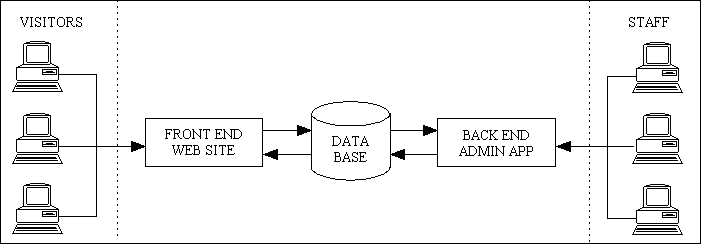
An organisation's online presence usually has two parts - a front end and a back end:
- Front Office/Showroom (public) - this is deployed on the internet and has unrestricted access and is therefore open to anybody. It displays content obtained from a database which is administered/maintained by a separate Back Office application.
- Back Office/Administrative (private) - this has restricted access and is open only to named users as it contains functions which update the database contents in ways which should not be possible through the front end website. It is usually deployed only on an intranet or extranet, but may also be deployed on the internet. Certain types of administrative web application may not have a Front Office counterpart if the data is not open to public viewing.
This can be shown in the following diagram:
A front-end web site and a back-end web application
Note also that the number of administrative functions in the back office application may far exceed the number of functions in the front end website. For example, in a typical e-commerce application the front end only has two major functions - (a) display products, and (b) accept orders. The back end application has to include functions to maintain every table in the database, plus functions to deal with order processing. This involves a complex set of operations with complex business rules to deal with such things as picklists, inventory, shipments, invoicing, suppliers, purchase orders, et cetera. It is possible for a back end application to be up to 100 times larger than the front end.
For a in-depth discussion on the differences please refer to Web Site vs Web Application and An end-to-end eCommerce solution requires more than a fancy website.
RADICORE is targeted at developers building form-based administrative web applications which use a relational database management system (RDBMS). With its inbuilt authentication system it is aimed primarily at web applications which are restricted to authorised users rather than web sites which are available to the general public.
RADICORE applications are based on the 3-Tier Architecture which means that the presentation layer used by the back-office application can be swapped for a totally different presentation layer used in the front-office website. This in turn means that all the components in the business and data access layers can be shared between the two presentation layers. This is explained in more detail in Using Radicore components in a front-end website. As the front end website can often be considered to be nothing more than a small window into the larger back end application, and as the back end application, when developed using the 3-Tier Architecture offers a full set of reusable and sharable components, it is often a good idea to develop the back end application before the front end. This idea is expanded on in Why you should build your web application back-to-front.
When deciding between a desktop application and a web application one should be aware of the advantages as well as the disadvantages.
Web Applications - advantages
A web application has the following advantages over a desktop application:
- All the application software is stored on a central web server instead of having copies of it installed on all the client devices that need to access it. This means that updates to the application can be performed on the central server without having to touch any client device.
- The only software required on any client device is a web browser. Various alternatives (e.g. Internet Explorer, Firefox and Opera) are freely available. This means that any device with a web browser can access the application (provided that the application's IP address is accessible to that device).
- The licensing for web applications is usually on a per-server basis, not per-user.
- A web application can support more users on a single server for the simple reason that once a response has been sent out to a client request all resources on the server used to satisfy that request are released and made available to other processes. With a non-web application resources on the central server are allocated as soon as the client session starts, and are not released until the session terminates.
Web Applications - disadvantages
As is usual in this world you don't get something for nothing, so all the advantages of a web application have to be weighed against the disadvantages, which are:
- The User Interface (UI) is limited to what can be supported in the web browser, which is not as "rich" as can be built into non-web applications.
Although various attempts have been made to make the UI of the web browser more like the GUI of a non-web application, using such technologies as javascript or ActiveX controls, there will always be differences, and one will never be a perfect substitute for the other. These technologies, not being under the control of the World Wide Web Consortium are not compatible with all browsers and may provide openings for security breaches. Also, the amount of time taken to develop this additional code, and therefore the cost, may be out of proportion with any additional benefit to the application as a whole.
Web Site
A web site is something which is accessible to anyone on the internet. It may contain any number of pages, either static (fixed content), dynamic (variable content) or a mixture of both. It may or may not use a relational database management system (RDBMS). It may simply be a method of making information available to the public, or it may include the means to search through a product catalogue and make purchases.
A web site such as this may be regarded as the "front office" or "showroom" whereas an administrative web application may be regarded as something which exists in the "back office" in order to handle the maintenance of the product catalogue and dealing with customer purchases.
Workflow
Please refer to What is a Workflow system?
XML Document
This is a type of document that contains structured data in a human-readable form which conforms to the XML Specification controlled by the World Wide Web Consortium (W3C).
In RADICORE there are no pre-built XML files. Each one is generated dynamically at runtime, transformed into another document (usually HTML) by an XSL stylesheet, then discarded.
One advantage of the XML+XSL approach is that the application can assemble its data in whatever order it wishes, can write this data to the XML document in whatever order it wishes, then have that data processed by the XSL stylesheet in whatever order it wishes. There is no need to be constrained by the sequence in which the final HTML document must be constructed.
XSL Stylesheet
An XSL stylesheet is a script written in the XSL language. It is used to transform an XML document into another document, which may be in one of various formats such as HTML, text, sql, PDF, or even another XML document.
In RADICORE all XSL stylesheets are supplied with the framework.
XSL Transformation
This is the process by which an XML document is transformed into another document, usually HTML, using instructions contained within an XSL stylesheet.
The transformation process is usually performed on the server, but this does incur a processing overhead. It is possible to offload this processing onto the client, but only if the client's browser has the relevant capabilities. RADICORE will perform all transformations on the server by default, but it does have the capability, if so instructed, of sending the XML document to the client so that the transformation process is performed by the client, thus requiring less resources on the server. Please see Performing client-side XSL transformations for details.
- The End -